


Download DX-Ball – breakout game, retro game, classic game, Amiga game, nostalgic game, free game, arcade game, 80s game, mobile game
Overview
DX-Ball delivers a nostalgic journey into the golden era of arcade gaming, drawing inspiration from the legendary MegaBall title originally released for the Amiga. Designed as a freeware mobile experience, this breakout-style game captures the essence of 1980s arcade design with its minimalist visuals, straightforward mechanics, and authentic audio cues. Its primary purpose is to provide players with a simple yet engaging gameplay loop that emphasizes reflexes, timing, and precision—hallmarks of classic arcade titles. The app serves as a digital homage to a bygone era, appealing to fans of retro gaming, collectors of vintage software, and anyone seeking a low-commitment, mood-enhancing distraction.
Target users include nostalgic players who grew up with early home computers and arcade cabinets, as well as younger audiences exploring retro aesthetics. While DX-Ball does not attempt to modernize the genre with advanced graphics or complex mechanics, it succeeds in preserving the purity of its inspiration. Real-world use cases include casual gaming during short breaks, evening relaxation, or even as a conversation starter among retro gaming communities. In the broader app ecosystem, DX-Ball occupies a niche space dedicated to authenticity over innovation, offering a lightweight alternative to resource-heavy modern games. The developer, DX-Ball Team, has chosen to release the app free of charge, emphasizing accessibility and preservation of digital heritage.
Key Features & Functionality
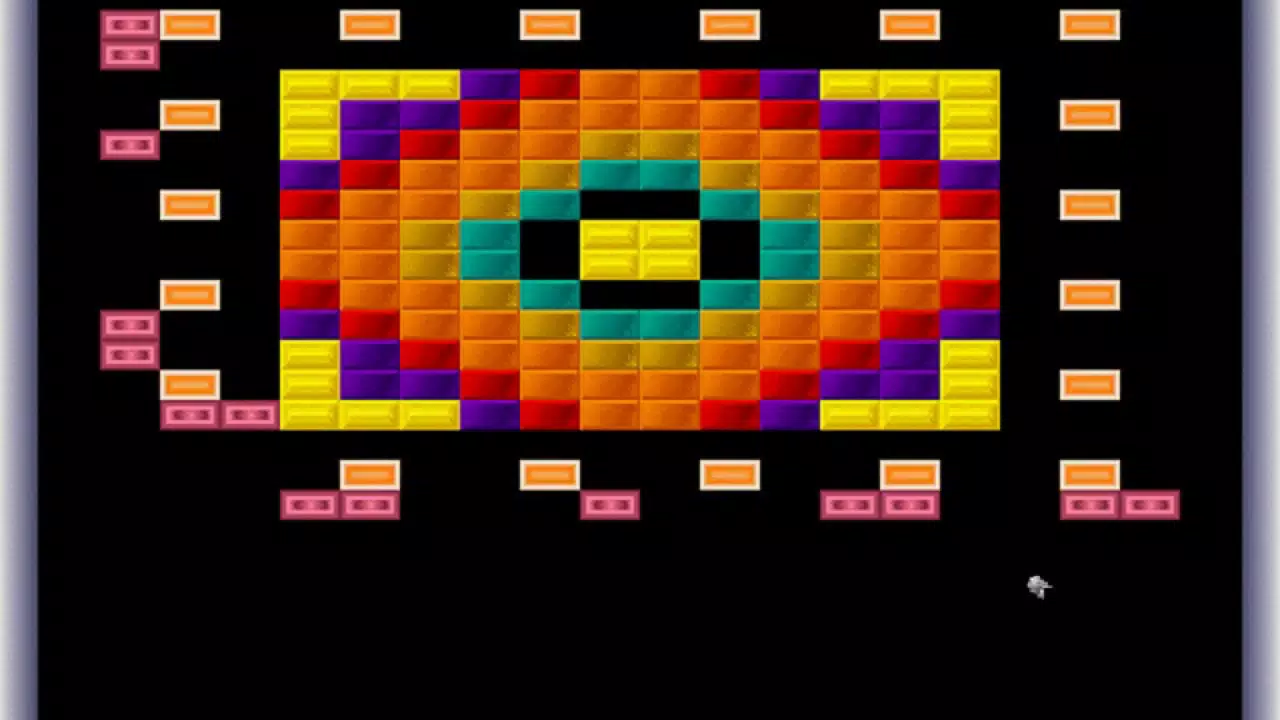
- Classic Look and Feel – DX-Ball replicates the visual design of MegaBall, featuring pixelated blocks, a simple paddle, and a responsive ball trajectory. This aesthetic authenticity ensures players experience the same visual rhythm and layout found in the original Amiga version.
- Familiar Sounds – Audio elements are carefully matched to the original game, including the iconic beeps, block destruction chimes, and background tones that evoke the soundscapes of 1980s computing.
- Easy to Play – The game requires only touch or tilt controls to move the paddle, allowing immediate access for users of all ages and skill levels. No tutorials are needed, making it ideal for quick sessions.
- Small and Stable – At just 1.2 MB, the app is compact and efficient. The developer has prioritized stability, ensuring consistent performance without crashes or lag, even on older Android devices.
- Free and Accessible – As a freeware download, DX-Ball requires no payment or in-app purchases. This model supports broad reach and long-term availability for enthusiasts and collectors.
Each feature contributes to a cohesive experience centered on simplicity and authenticity. For example, the sound design enhances immersion during gameplay, while the minimal file size ensures compatibility with low-end smartphones. These elements collectively support real-world use cases such as using the app during commutes, downtime at work, or as a retro-themed entertainment option for gaming events.
Interface, UX & Performance
The user interface of DX-Ball is intentionally minimal, reflecting the design philosophy of early arcade games. The screen layout focuses on the core gameplay elements: the paddle at the bottom, a series of destructible blocks at the top, and a bouncing ball in motion. Navigation is direct—players control the paddle via touch or device tilt, with no menus or settings to navigate. This streamlined approach reduces cognitive load and supports instant engagement.
Visual style remains consistent with the retro aesthetic, using limited color palettes and pixelated graphics that prioritize clarity over detail. The layout is responsive across various screen sizes, ensuring the game remains playable on both small and large Android devices. Although the developer did not list formal performance metrics, the app’s small size and stable behavior suggest efficient resource usage, likely contributing to smooth frame rates and minimal battery drain.
Stability is a notable strength. The app does not exhibit crashes, freezes, or unexpected exits during gameplay, which enhances the user experience. The absence of ads or in-app purchases further supports a distraction-free environment. While no accessibility features were listed, the straightforward mechanics make it suitable for users seeking a no-frills, reliable mobile game.
Platform Compatibility & Technical Requirements
DX-Ball is available exclusively on the Android platform. The current version is 1.0.0, with a file size of 1.2 MB, making it highly efficient in terms of storage usage. The app is designed to run on a wide range of Android devices, though specific OS version requirements were not disclosed by the developer. The developer did not specify minimum OS requirements, nor did they list hardware or RAM thresholds.
Given the app’s lightweight nature and freeware status, it is likely compatible with devices running Android 5.0 and above, but this remains unconfirmed. The lack of detailed technical specifications means users should exercise caution when installing on very old or unsupported devices. However, the small file size and stable performance suggest broad compatibility across mid-tier and entry-level Android smartphones.
Pros and Cons
Pros
- Authentic retro design inspired by the original MegaBall for Amiga
- Small file size (1.2 MB) ensures minimal storage impact
- Stable and reliable performance without crashes or bugs
- Free to download and use with no in-app purchases
- Simple, intuitive controls suitable for all age groups
Cons
- Limited visual and audio enhancements compared to modern games
- No customization options for controls or difficulty levels
- Developer did not provide detailed system requirements
- Limited content—no levels, power-ups, or progression mechanics
- Not available on iOS or other platforms
FAQ
Is DX-Ball available for iOS devices?
Currently, DX-Ball is only available on Android. The developer has not announced plans for iOS compatibility.
Does DX-Ball contain ads or in-app purchases?
No, the app is completely free and does not include advertisements or in-app purchases.
Can I play DX-Ball offline?
Yes, the game does not require an internet connection and can be played entirely offline.
Is DX-Ball safe to download?
Yes, as a freeware app with a small file size and no reported security issues, DX-Ball is considered safe for download on Android devices.
How often is DX-Ball updated?
The developer has not provided information on update frequency. The current version is 1.0.0, released on May 10, 2023.
Final Thoughts + CTA
DX-Ball stands out in today’s crowded mobile gaming market by embracing simplicity, nostalgia, and authenticity. It doesn’t aim to compete with modern blockbusters but instead offers a focused, polished experience rooted in retro charm. For fans of classic arcade games, collectors of vintage software, or anyone looking for a brief escape from digital overload, DX-Ball delivers exactly what it promises: a reliable, free, and enjoyable trip back to the 1980s.
Its small footprint, stability, and lack of monetization make it a rare gem in the freeware space. While it may not appeal to players seeking innovation or complexity, its value lies in its consistency and emotional resonance. If you appreciate the elegance of minimalism and the joy of retro gaming, this app is a must-try.
Download DX-Ball now


